This post marks an exciting new theme for More Than Scratch The Surface. Regular readers won’t recognise the site! I’ve extensively overhauled the theme and in this post I explain the changes, the choices I made and why I made them.
Firstly, for my regular readers, if you’re reading this in a feed reader, come on over to the site and check it out. I’d love some feedback from you. And if you find any problems, please let me know.
Screenshots
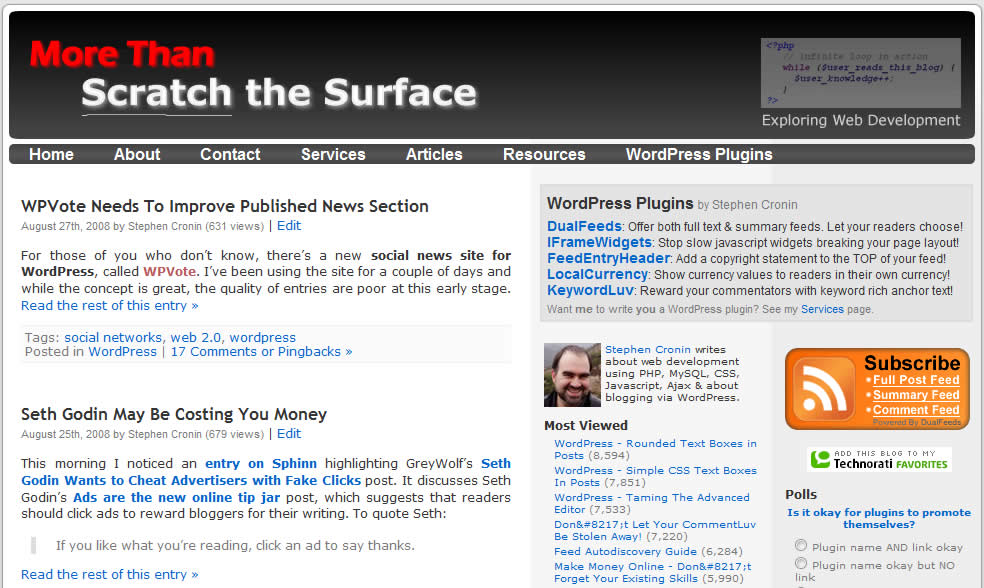
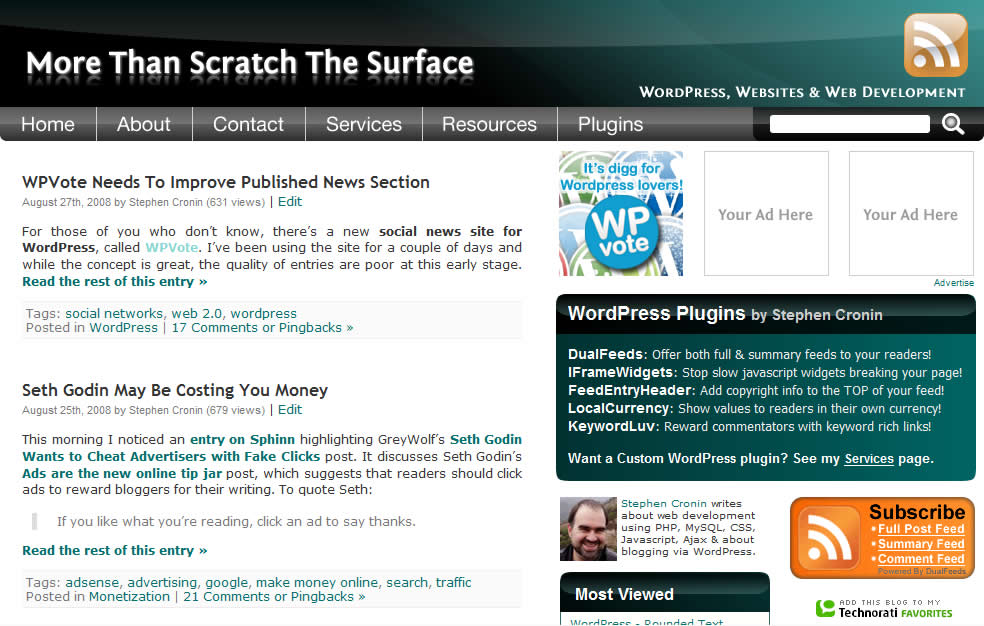
For posterity, here is a screenshot of both the old theme and the new one:
A New Theme?
Actually, it’s not a new theme, it’s the same theme. I’ve just totally overhauled it to the extent that you wouldn’t know it’s the same theme.
My original plan was to start from scratch and build a new theme from the ground up. However, I’m short on time at the moment, so I decided to just adapt my current theme.
I started by creating the header graphic and the menu section in straight HTML, then modified my current WordPress theme to incorporate it.
Making the new stuff work with the old has resulted in some very messy HTML / CSS. I’m quite irritated by this, so I’m still planning to create a new theme, from the ground up, when I have time.
It’s also not quite finished yet. I have some other features I’d like to add and I’m not quite convinced by some things (the font, the link colour, the background colours), so there’ll be some small changes in future.
However, this post marks the big change and I’m pretty happy with the general look of the theme, especially the header. So which designer did I use to create it? Me! And I really enjoyed doing it.
The Menu
I originally included a text based menu, but ended up changing to an image based menu.
In general, I prefer text based menus because they’re simpler, cleaner and easier to maintain. However, I’m a bit of a control freak at times, and the text menu didn’t look so good when the text was resized. This was a ‘problem’ even when specifying the font in px (IE won’t resize but Firefox will).
By using an image based menu I could ensure that the menu will always look right. As a bonus, using an image allowed me to use a far more attractive font! I was going to go all glassy buttons with the menu, but decided that would make the page too busy.
I understand that one of the principles behind accessibility is that the user can decide how the page will look. I don’t mind resizing for most of the page, but I don’t want the menu to appear broken, especially as the site acts as an advertisement. Let’s face it, potential clients are probably more concerned (wrongly) about looks than they are about accessibility.
Anyway the menu IS accessible: the HTML is clean and the menu is an unordered list. If the user disables CSS, provides their own style sheet or is using different media, they’ll get a nice list of menu options. Note, I made a point of saying the menu is accessible, because once you hit the sidebars, things aren’t perfect. It’s not terrible, but not as good as I’d like.
Images And Performance
Having read many times that one of the keys to speeding up a page is to reduce the number of http requests, I made a concerted effort to reduce the number of images used in theme. I even went so far as to sacrifice size to achieve this.
The old theme had 8 images with a total size of 18KB. The new theme only has 3 images, but they weigh in at 68KB. The new images were always going to be larger than the old theme’s, but I’m sure I could have kept it under 50KB if I’d split the images up further.
The image based menu increased the total size of images used, especially as the image changes on mouse hover. I used CSS sprites to keep the number of images needed down: the images used for the menu’s normal and hover states are both part of the main header image.
I’ll admit that the image size worries me, so I’ll be keeping an eye on performance. I’m not sure at what point the size outweighs the number of http requests.
This influenced my decision not to use JQuery to fade in the hover state. I’ve been playing with JQuery lately and I like the idea, but it’s not worth adding the size of the JQuery script just to get fading menus. If I start using JQuery for something else, I’ll revisit this idea.
Finally, I used an image for the background of the WordPress plugins blurb near the top of the sidebar. No big deal right? Well I actually used a vertical sliding doors technique to cater for the user resizing the text. It may be overkill, but you have to increase the text size about 20 times in Firefox before it starts to fall apart. I’ll write up how I did this in a separate post.
Advertising
Another big change with this theme is that I’ve finally embraced direct advertising and built ad spaces into the theme. I’ve been planning to do it for a while and the new theme seemed like the right time to introduce it.
I’m offering special introductory prices (50% off) until the slots fill up, making it only $12.50 for a spot at the top of my sidebar, or $7.50 for a spot lower down in the right sidebar. If you want to advertise on More Than Scratch The Surface, check out my Advertise page!
One important thing to note however, is that I’m nofollowing the links, to protect both the advertiser’s site and mine from attracting a toolbar PageRank penalty from Google. Advertising here is purely to build brand awareness for your site and send you traffic, not to game the search engines.
Final Thoughts
I’ve spent a fair bit of time making these changes to my theme and I’m very happy with the new look. But what do you think? Leave a comment and let me know!
Stephen,
I really like the new look and the advertising blocks you have added. Also, learnt a few valuable insights that you provided while you created this theme. Thanks for sharing those. I did have one question though.. about jQuery. Isn’t it already a part of WordPress? If we tried to use it in the theme, does that mean additional kb’s on the page?
Good luck!
Hi K,
Thanks!
JQuery is included with WordPress but by default, it’s only actually called in the Admin pages, not in the rest of your site. When people view your site, the JQuery script is just sitting on the server, it’s not downloaded to their computer. Of course some themes may call it and use it, but most themes don’t.
The minified version of JQuery is 54KB, which I believe drops to about 20KB if you’re using gzip. Google has a hosted copy of the JQuery script which may be better – the theory is that if your visitors have been to another site using Google’s copy, then it’s already cached on their machine and doesn’t ahve to be downloaded.
Hey Stephen, that makes perfect sense. The minified version of it doesn’t sound that bad though and especially as it gains more traction, there is a good chance the visitor would already have it downloaded. Keep up the great work! 🙂
I must say I also really like the new design especially the new color. The offscreen really makes it stand out more than just the gray also maintaining a very professional feel. I agree the new menus are an improvement just having the color I feel really change the whole feel.
Thanks John,
I’m glad you like it!
Hey Stephen, you definitely made a great work with this new version! Congratulations and keep up the good work!
Hi Jean-Baptiste,
Thanks. I still have a way to go yet. I want a slideshow eventually. I’ve seen your excellent tutorial on integrating Smooth Gallery, but I really want to find a JQuery solution. I’m sure they’re out there. I just have to find the time…
Hi Stephen. Looks good overall, much more “professional” for want of a better word. I see what you mean about the link colour. It’s obvious when the link-text is bold, but when it’s normal it’s not so easy to spot the green amongst the black text. Maybe use a darker version of the orange that’s in the RSS graphics… or purple usually goes well with green?
HTH
Cheers, Jon
I like the color scheme it makes everything easy to read. There have been a few bloggers recently (won’t mention names) that re-did their themes and made the blog harder to read and harder to find things. Job well done.
I like the new look of the site. Rather than going for a completely new design you have upgraded and improved your previous design. What i really dislike is to see a website that you visit regularly suddenly and completely change the look and feel of their site, often for the worse.
I think the green blended in with the black looks really nice, and makes the site look more professional. Good job!
Well, i like the new design for sure. Especially i like this dark green color combination. Overall, complete design looks more modern and oval. The code is clean until sidebar as you said :), but that is not so important. Good work.
The new color scheme looks super. you mentioned issues with the coding and that you will be building it from scratch eventually, but truthfully, it does look great the way it is. And, yes, I like the font used in the images.
I guess I am just like everyone else… I like the new theme – thanks for sharing it. Very nice, in my opinion.
Nice look and design, all fit together in an elegant way, This is one of the blogs I always read and like.
Ordinarily I don’t like the wide sidebar as I feel it takes away from the content but on your site it works. I don’t think I have seen a 3 across 125×125 sidebar for ads but I like the look better than the vertical stacking. I really like the header graphic too. nice job!
Hey, big fan of the new design, I really love the colors, they are unique and arn’t overused like on some sites.
The design is fabulous. I love the look of the buttons at the top.
It’s a pity that one can’t use this type of design with the Semiologic blog software.
Overall the colors and the design is very appealing. A job well done…
I really like the design! it is really cool! I really love your blog.
I know I’m late to the party, Stephen, but I think the redesign looks great: fresh, clean, and professional. Everything loads very fast and looks consistent across browsers (including IE!). Great job! 🙂
Hi Jeff,
The door’s always open to you, no such thing as late to the party… 🙂
Thanks, but I really want to pull it apart and build it from scratch. It’s not as clean behind the scenes as it should be.
I think the color scheme makes this blog very simple and easy to read. Very professional. Unlike many gimmicky blogs that attempt to rely on aesthetics only, your blog gives off a very modern and proper vibe.
The design is really amazing! I love the color and its design. I salute you! Cheers!
thanks.
It has been a while since I’ve visited your blog Stephen and the new theme looks fantastic. Your advertising rates seem very fair and reasonable as well. Best of luck with it all.
Hey Stephen, your new “look” is great but i have one comment about it. The only thing i would change out is the color. I would change it from green to blue (just my personal preference). Have you tried different colors or is this the only one that’s available? Also, i’m interested in advertising on your site but i would prefer a text link instead of a button. Could we work something out?
I’d be interested in linking to the site too, again a text link would be great if possible?
I think the new theme looks much better and also helps the site flow better.
I like the new theme of the site much better then the old one. You can really tell quite the difference between the two.
Theme is very clean and looks good.
Why you have not put any adsense ads?
The new theme is more livelier and good to the eyes. I just suggest the header will look little smoother. 🙂 But over all I like the theme.